
I LOVE mechanical keyboards, and I don’t just have lots of vintage ones; I BOUGHT a lot of them new back in the day, or recovered nearly-new-but-cast-off-for-nothing shortly thereafter, or had computers from back in the day that came with them built-in. I still have and use them.
So when I saw PBTfans 1984 R2 keycap set and its aims to appear “Apple Vintage,” I knew I had to buy it, build something interesting, and make the comparison to some actual Apple Vintage hardware. My goal was to have something that resembled and felt Vintage Apple but was modern, worked with everything, and wasn’t too expensive. And here’s what resulted…
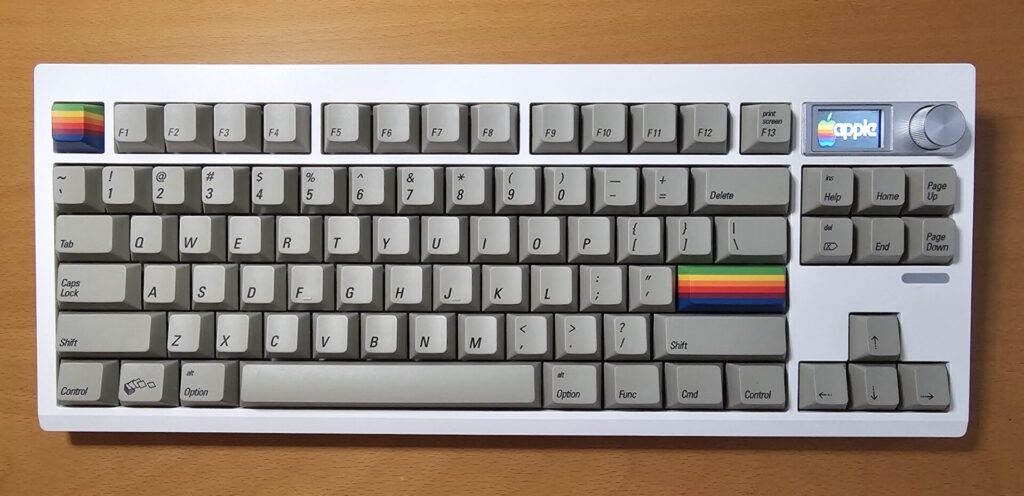
This is not a “pre-built,” but something I put together from a set of components, thereby making this a sort of review of three different items:
- GMK87 TKL base keyboard case/board in White (https://amzn.to/3MXmV05)
- Akko V5 Creamy Blue Switches (https://amzn.to/48YQ9V0)
- PBTfans 1984 R2 keycaps sets (https://kbdfans.com/products/pbtfans-1984)
I like the GMK87 keyboard base a lot – this is my second board with it. Once the firmware is updated, it works great with VIA for setting up layers and macros, and I find the Bluetooth and 2.4 Ghz dongle reliable and compatible with nearly everything, and honestly, using the dongle with games feels no slower than my Lemokey wireless “gaming” keyboard. It also works via a wired USB connection. In general, I am not impressed with fancy metal cases (my Lemokey has one, so I know) and would rather not have an unneeded extra two pounds in my backpack when I move this one to different locations. I’ve had a lot of switches in this “fantastic plastic” over the years, and I like how they sound in this too. I even like the LCD, and in this case I put in an image of an Apple //e case badge. This GMK87 did NOT come with a sheet of plastic film over the internal foam layer like my old one did – I don’t know if this was an omission or if GMK is just not including the sheet anymore – but without the sheet, building this board was easier, since I didn’t have to poke 87 holes in the sheet before installing the keyswitches. The GMK87 has many features that I really like as just a “mechanical keyboard” that keep me coming back: the switches are “hot swappable” so switching the actual switches later is easy, it can connect to three different devices via Bluetooth (such as your PC, your smartphone, and a Mac) and then a 4th device via the USB dongle, when not displaying animated GIFs or artwork, the LCD display shows things like Caps Lock and battery level and the time and the connection method, and there are foldable feet at the rear that allow for two different tilt angles.
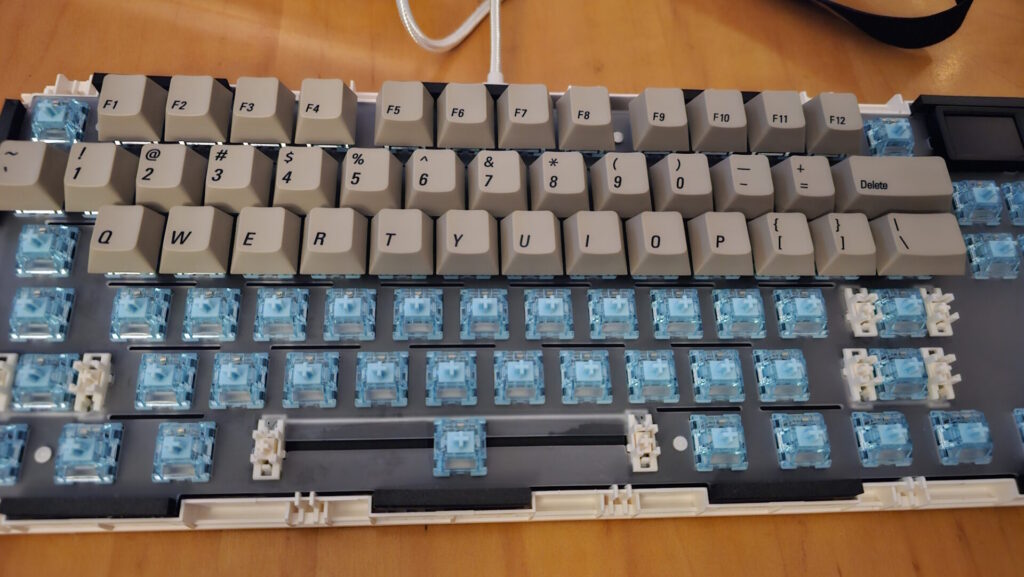
Here’s a mid-build photo; the GMK87 opened up and the Creamy Blues pressed into every socket, and some 1984 keycaps installed on some switches. Installation really is a tool-less process; de-installation is simpler with a keycap and switch puller, which happens to come with the GMK87.
The Akko V5 Creamy Blues are intended to be a smooth tactile switch, and that they are. I have landed on Akko Lavender Purple in my other GM87, but to reproduce the Vintage Apple feel, I wanted something with a later tactile bump and a smoother force curve, and the Creamy Blues are that to a “T.” They do NOT feel like Alps Salmon or Alps Orange, both of which I have and use in my Apple IIc+, my Apple Extended Keyboards (M0115) and Apple Keyboards (M0116) on my IIGS, which is what I was shooting for. (Does anyone have a good suggestion to duplicate the feel of Salmons or Oranges?) But to my pleasant surprise, they DO feel like the first generation Apple //e keyboards with the white keycaps, which is what my //e came with in 1983 before I replaced it with a black-keycapped keyboard in 1985 with Alps Long-Stemmed White switches after a soda-spill when I was a kid. I don’t have the 1983 keyboard anymore, but I have friends with them, and believe me, these Creamy Blues feel exactly like those. Fun!
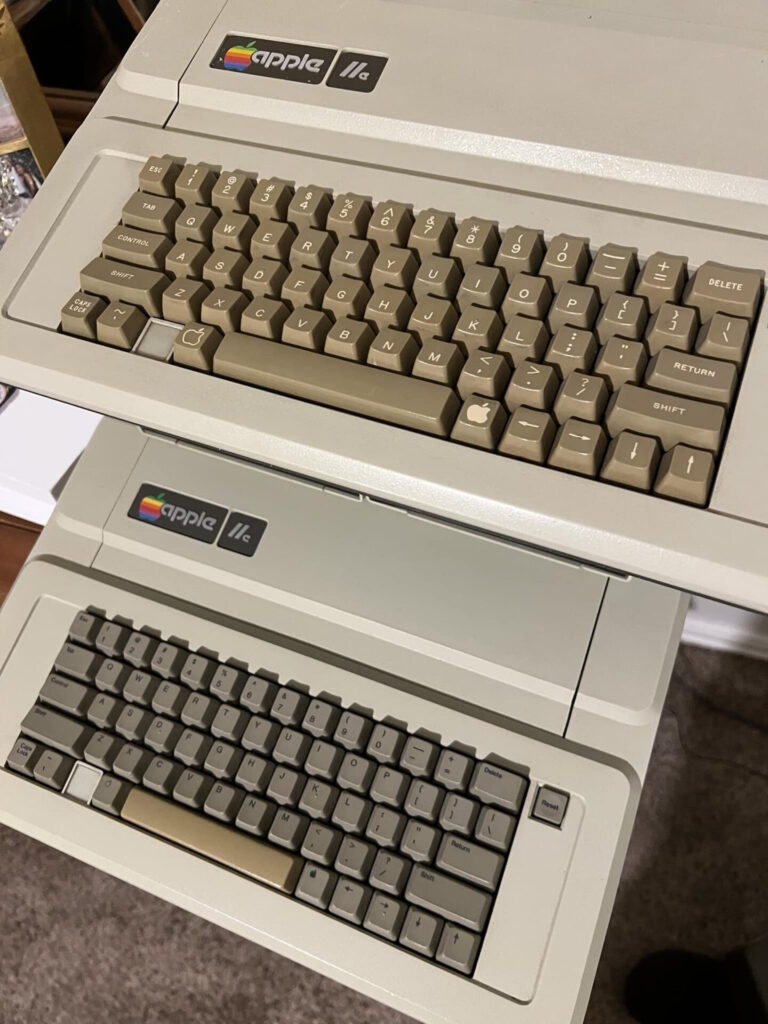
The 1984 keycaps are also really fun, but anyone thinking they are clones of Vintage Apple is wrong. They are really a mutant-hybrid of a lot of different Apple Keyboards of the era. The profile is Cherry, which is sort of close to the M0115/M0116 and probably the closest of the “modern” profiles to what Alps and Apple were doing back in 1987, but the Vintage stuff is slightly more “spherical” and the keycap faces are slightly wider and taller. Actually, the 1984 keycap profile is basically the same shape as the 1983 “white keycapped” //e, though not quite as tall. The Fonts and Legends are VERY close – using a font that’s a good recreation and with legends low and to the left on each keycap – but you can see that they are little smaller than the originals. You’d probably only notice the difference if you had both keyboard side by side. The Beige color is absolutely WRONG for this – the M0115/M0116 keyboards the 1984 imitates were “Apple Platinum” instead of this “Apple Dark Beige.” Yes, Apple had Dark Beige keyboards on the Mac 128/512/Plus, but the keycap shape and the fonts were totally different (and is what’s on my Apple //e 1985 keyboard with black legends, pictured for comparison.) The Apple //c DID have this font in black, with Apple Dark Beige keycaps on a white case, but the keycap profile was completely different (I’ve included a photo for comparison).
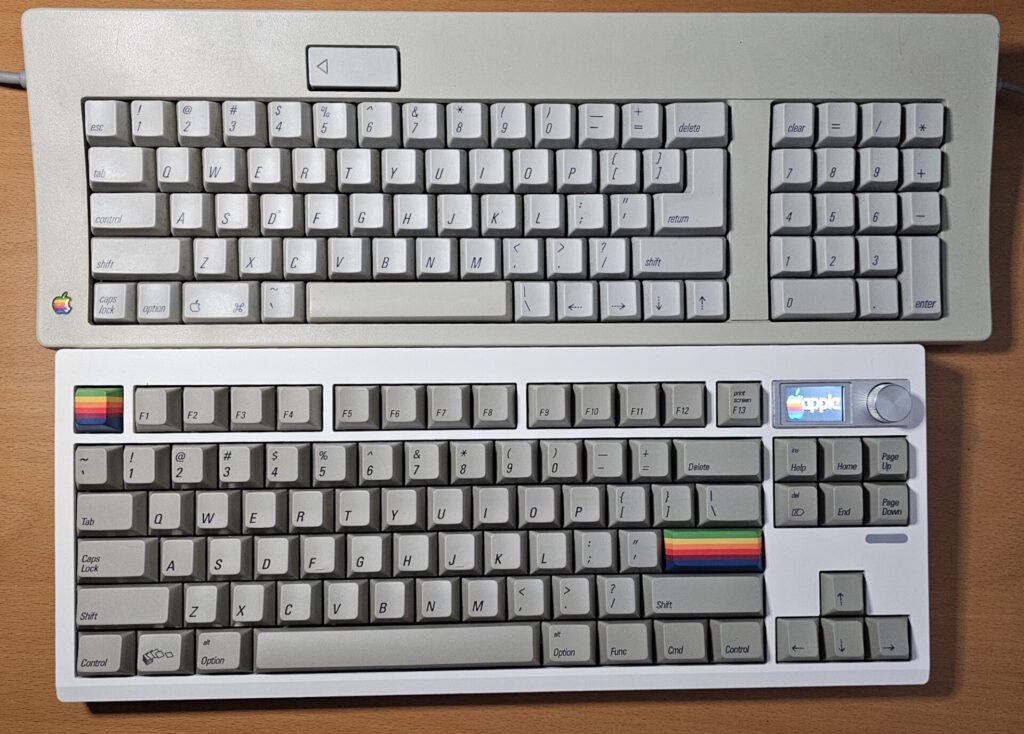
So this build is a fun hybrid of them all. The White case and Dark Beige keycaps are the same color combination of the original 1984 Apple //c, the keycap shape and keyswitch feel are the same as the 1983 Apple //e but with a color scheme of the later 1985 Apple //e switch, and the general keyboard layout and font appearance and shape are more like the later Apple Keyboard (M0116). I sprang for some additional “iconic” keycaps that included the rainbow keys and the funky “Windows” key, and they make me smile, which is kind of the whole point for such toys. Setting the screen to show the Apple //e case badge ties it all together. I like it and am happy. It is quieter than most of my mechanical keyboards and feels good, and am looking forward to putting it into the rotation at work.
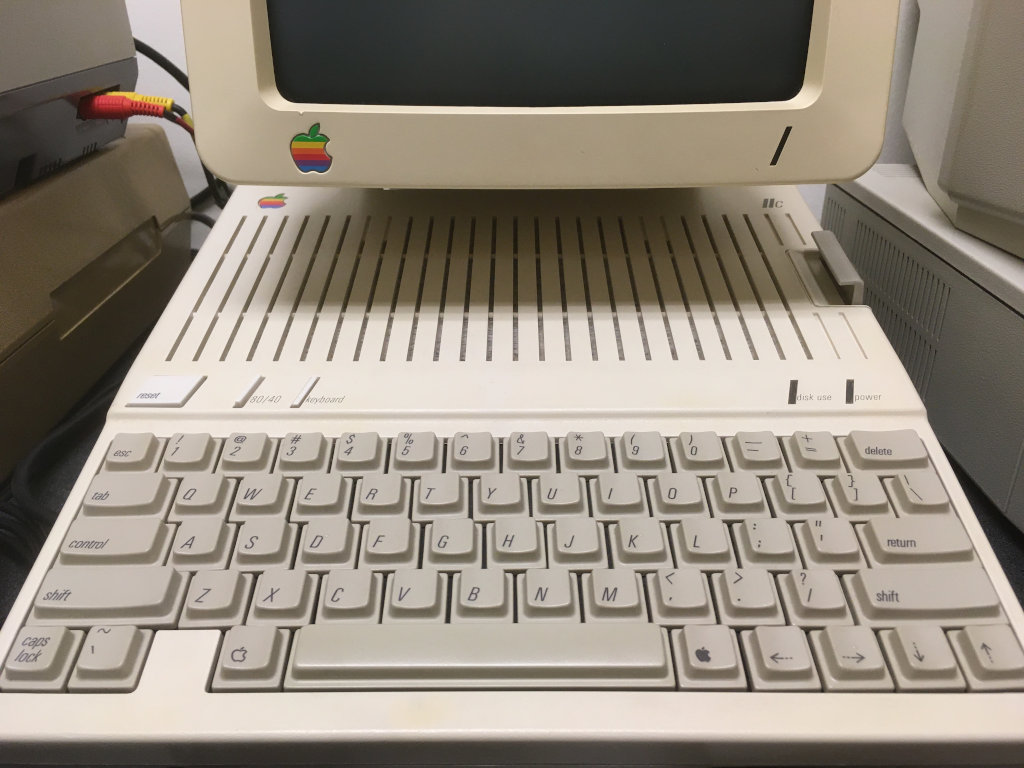
I’d say this color combination is very similar to the original “Snow White” Apple //c: white(ish) case and Apple Dark Beige keycaps with the italicized san serif font. The keycap profile is more like the original Apple //e with white legends, shown above.
If I were to offer any suggestions to PBTfans, they would be…
- Make an Apple Platinum color version. Make a black “NEXT” version too.
- Make the legends larger.
- The Modifier Keys should really be all lower case instead of Initial Caps. (“caps lock” vs. “Caps Lock”)
- Really want to match the M0115/M0116 keyboards? Include “D” and “K” keycaps with the little bumps on them, which is what Apple did back then instead of today’s “F” and “J” keys. You already include smooth “F” and “J” keycaps, so I know you are thinking about this sort of stuff.
- Make a Backlit Legend version!!! With LED boards basically all being South Facing these days, there are basically no really cool and interesting backlit South Facing LED compatible keycaps out there that are properly backlit illuminated with legends on the lower part of the keycaps. BUT THIS COULD BE IT!!!
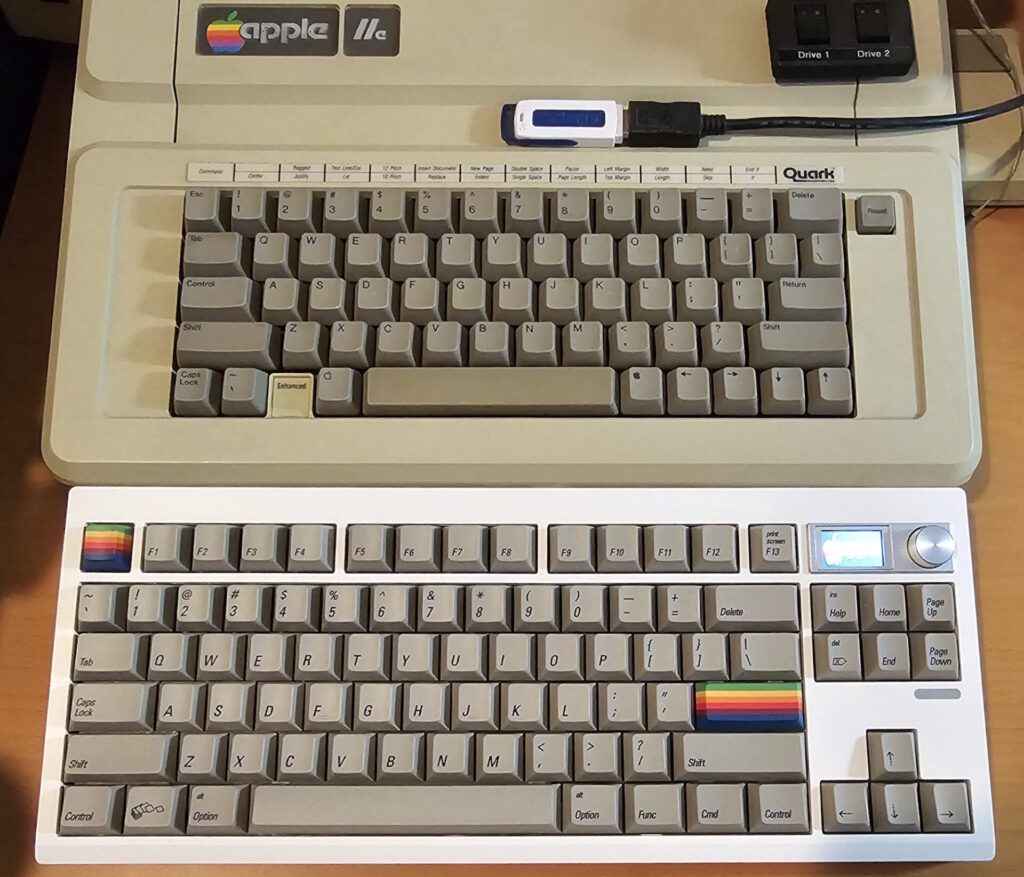
So, if you’re interested in building a modern mechanical keyboard with all the fixin’s that reminds you of Vintage Apple while not directly imitating anything specific, then this is a great way to go. Experiment with different switches if you’re shooting for a different keyboard feel.
Product Name: GMK87 TKL in White
Vendor: Amazon
Price: $62
Product URL: https://amzn.to/3MXmV05
Product Name: Akko V5 Creamy Blue Switches
Vendor: Amazon
Price: $28
Product URL: https://amzn.to/48YQ9V0
Product Name: PBTfans 1984 R2 keycaps
Vendor: KBDfans
Price: $59 – $110, depending on the customized keycap icons and colors you wish
Product URL: https://kbdfans.com/products/pbtfans-1984
The Highs: Quite a fun keyboard and conversation piece for Vintage Apple aficionados. Full featured. Feels like an Apple //e from 1983 as built.
The Lows: A little spendy for a keyboard that you have to put together and maybe program yourself.
The Bottom Line: You know you want this, you beautiful nerd. Go get it.
Rating: 4.5 Stars out of 5